
Kaomoji Dividers and Text Borders to Copy
Aesthetic text dividers in one tap, with no account and no cost: lace, lines, stars, hearts, flowers, title frames and borders featuring kaomoji like ʕ•ᴥ•ʔ and ₍ᐢ. .ᐢ₎. Type a title and it lands in the middle of every divider, or build your own line from scratch.
- 50+ dividers
- ━ custom divider builder
- ╭╮ title boxes
- Free
Kaomoji dividers and borders
Know someone building a Carrd or a Discord server?
Share these dividers so every section looks neat.
Dividers for Bios, Server Headers and Journals
Titled dividers ready to drop into a page. Copy grabs the whole line; Edit in tool lifts the title into the box so every divider can frame it.
What Are Kaomoji Dividers?
Quick answer: kaomoji dividers are decorative lines made of text symbols, sometimes with a small face in them, used to split a bio, post, or server into sections. Examples include ꒷꒦︶꒷꒦︶ ✿ ︶꒦꒷︶꒦꒷, ─── ⋆⋅☆⋅⋆ ─── and ʕ•ᴥ•ʔ ─────── ʕ•ᴥ•ʔ.
They are also called text dividers, emoji dividers, kaomoji borders, or aesthetic dividers, and they first became popular on Amino, Tumblr, and Carrd before spreading to Discord, Instagram, and Notion. Find faces to put in your dividers on the kaomoji page.
Seven groups organise them: Soft and cute, Clean lines, Kaomoji dividers with faces, Stars and night, Hearts and love, Flowers and nature, and Title boxes and frames. Any title you type appears in the centre of every divider, and the builder lets you design one with your own length and ornament.
- 7 Divider styles
- 14 Line types in the builder
16 Ornaments
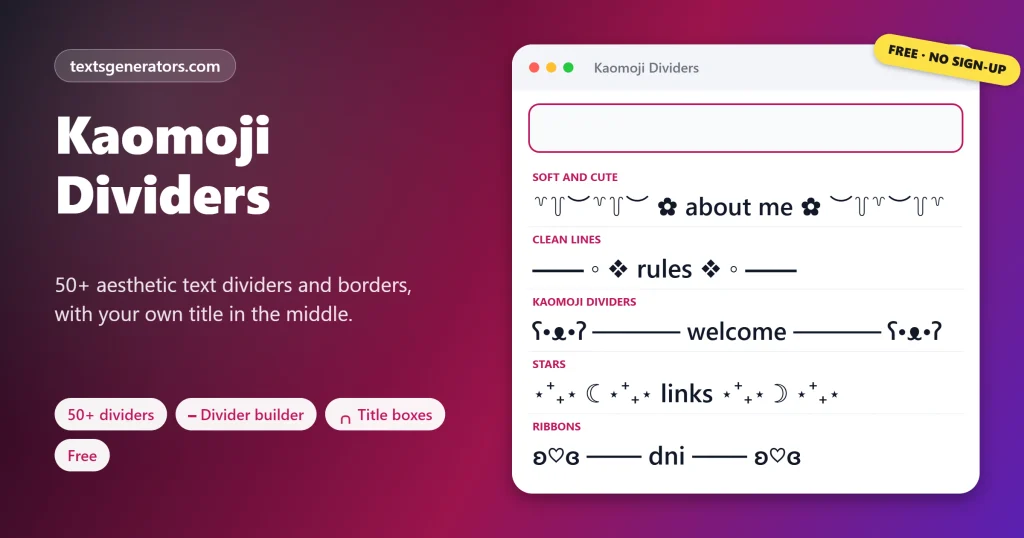
How to Add a Title to a Text Divider
- Type the section name: For example, rules, about me, or links.
- Browse the styles: Every divider now shows your title in the middle.
- Copy the one you like: A single tap grabs the entire ornamented line.
- Repeat for each section: Use the same style throughout so the page looks consistent.
Make the title itself shine with sparkle text.
Where Do Text Dividers Work Best?
| Platform | Use | Tip |
| Discord | Rules, roles and welcome channels | Use Discord copy mode for dividers with asterisks or tildes |
| Carrd | Separating sections of a one-page profile | Longer lines look fine on wide layouts |
| Instagram and TikTok bios | Splitting a bio into lines | Keep dividers short; bios are tight |
| Amino and Tumblr | Post headers and story chapters | Match dividers to the theme of the post |
| Notion and Google Docs | Journal and planner headings | Title boxes look neat in notes |
Style channel names with Discord fonts.
Which Symbols Make Aesthetic Dividers?
Lace ꒷꒦ ︶
Yi syllables and a scallop bracket that look like lace trim. Write section titles in aesthetic fonts.
Lines ─ ━ ═ ┈
Box-drawing characters for clean, modern rules.
Ribbons ʚɞ ୨୧
Curly shapes that read as bows on either side.
Specks ˚ ₊ ‧ ⋆
Small marks that scatter like fairy dust.
More lines, hearts, and stars are on the text symbols page.
How Do You Make a Title Box?
Tick: Make it a title box in the Custom Divider Builder. The builder draws rounded corners with ╭ ╮ ╰ ╯, places your title on its own line between them, and keeps both sides even. Title boxes suit server rules, journal pages, and pinned posts, where a heading should stand out from the text below.
Kaomoji Dividers FAQ
What is a text divider?
A decorative line of symbols used to separate sections of text, such as ─── ⋆⋅☆⋅⋆ ───.
What are kaomoji dividers?
Dividers that include a small text face, like ʕ•ᴥ•ʔ ─────── ʕ•ᴥ•ʔ.
How do I copy a divider?
Tap it. The full line is copied, including any title you typed.
Can I put my own title in a divider?
Yes. Type it in the box; it appears in the centre of every divider.
What are aesthetic dividers?
Soft, decorative dividers made of lace, ribbons, stars, and flowers, popular on Carrd and Discord.
Which characters make lace dividers?
꒷ and ꒦ from the Yi script plus ︶ scallops.
What does ʚ♡ɞ mean?
A bow with a heart in the middle, often used as a cute divider ornament.
Can I use dividers on Discord?
Yes. They work in messages, channel topics, and server descriptions.
Why do some dividers show boxes?
They use rare symbols your font lacks. Clean lines like ━ and ─ work almost everywhere.
Are emoji dividers the same as text dividers?
Emoji dividers use colour emojis; text dividers use plain symbols that look the same on every device.
Can the divider length be adjusted?
Use the Length slider in the Custom Divider Builder.
What is a title box?
A three-line frame with rounded corners that holds a heading.
Do dividers fit in an Instagram bio?
Short ones do; pick Instagram bio under Max length to check.
What were Amino dividers?
Decorative lines used in Amino community posts, the same style as these.
Can I save a divider as a picture?
Divider Banner Image turns a short divider into a PNG.
Can I type dividers with a shortcut?
Install Divider Shortcuts and type: line or bow.
Which divider looks best for rules?
━━━━━━ ◦ ❖ ◦ ━━━━━━ or a title box looks clear and official.
Can dividers include animals?
Yes, the Kaomoji dividers group has bears, cats, and bunnies.
Do dividers work in Notion?
Yes, paste them as normal text in any block.
How many dividers are there?
Over 50 ready-made, and countless more from the builder.
Do I need an account?
No. Everything is free and works in your browser.
Copy a Divider
ʚ♡ɞ ─── ✿ ─── ʚ♡ɞ
Fifty-plus kaomoji dividers and a builder for your own. ━ Copy Dividers
- Angry Kaomoji: Mad, Annoyed and Raging Faces
- Animal Kaomoji: Dogs, Bunnies, Birds and Fish
- Bear Kaomoji ʕ•ᴥ•ʔ and Text Bears to Copy
- Blushing Kaomoji: Shy and Flustered Faces
- Cat Kaomoji and Text Cats to Copy
- Crying Kaomoji: Tears, Sobs and Happy Tears
- Cute Kaomoji and Kawaii Faces to Copy
- Dancing Kaomoji and Music Faces to Copy
- Emoticons Copy and Paste, With Meanings
- Happy Kaomoji: Smiling and Excited Faces
- Heart Kaomoji: Love, Kisses and Hugs
- Kaomoji Copy and Paste: 1,200+ Japanese Emoticons
- Kaomoji Maker: Make Your Own Kaomoji
- Laughing Kaomoji: Giggles, Cackles, and LOL Faces
- Lenny Face Copy and Paste ( ͡° ͜ʖ ͡°)
- Sad Kaomoji: Gloomy Faces to Copy
- Shocked Kaomoji: Surprised, Nervous, and Sweating Faces
- Shrug Emoticon ¯\_(ツ)_/¯ Copy and Paste
- Sleepy Kaomoji: Tired, Sleeping, and Good Night Faces
- Sparkle Kaomoji and Sparkle Text to Copy
- Star Kaomoji: Star Eyes, Wishes and Night Skies
- Table Flip (╯°□°)╯︵ ┻━┻ Copy and Paste
- Text Emojis: Copy and Paste Keyboard Faces
- UwU Faces and OwO Emoticons to Copy
No tools match your search. Try another word or choose "All tools".