
Arrow Text Generator ➜ ➤ ⇒
Point at what matters. Surround words with arrows (➤ Text ◄), build step chains (Idea → Plan → Launch), make arrow bullet lists and call-to-action lines (👇 Link in bio 👇), or grab a single arrow symbol with its Alt code. Made for bios, captions, Discord channels, notes and gamer tags.
- 220+ arrow layouts
- Flow Maker for steps
- 200+ arrow symbols
- Emoji or plain arrow switch
Every arrow layout
Point a friend in this direction ➜
If these arrows tidied up your bio or your notes, someone you know probably needs them too.
Arrow Call-to-Action Lines and List Starters
Short lines that use arrows the way creators and brands do. Press Grab to copy one, or Customize to move its wording into the generator and try other arrow layouts.
What Is an Arrow Text Generator?
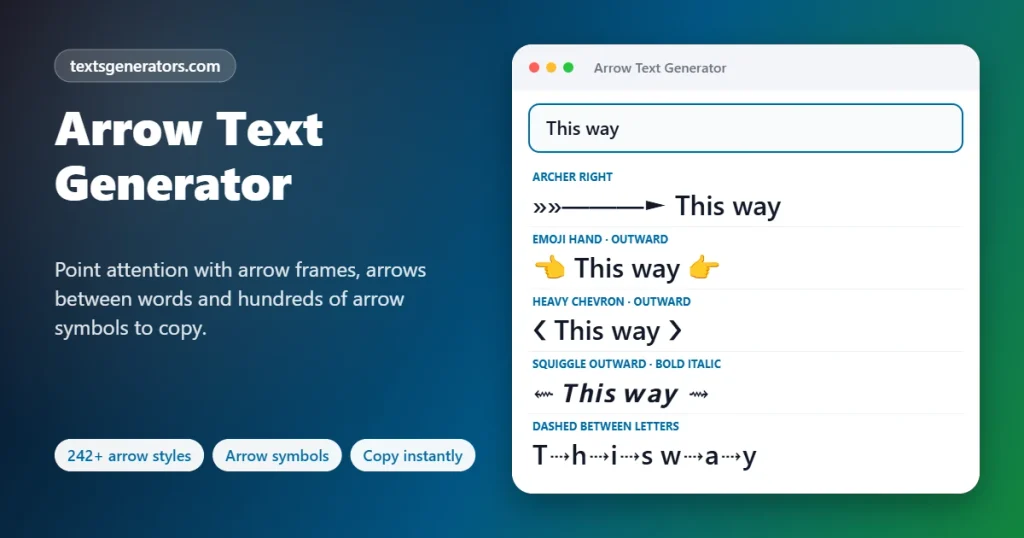
It is a tool that places arrow symbols before, after, around, or between your words, producing lines such as ➤ Start here, ← Swipe →, or A → B → C that can be pasted into any app.
Keyboards have no arrow characters you can type into a sentence; the arrow keys only move the cursor. Yet Unicode, the universal character set, defines several hundred arrows: thin ones, double ones, curved ones, heavy dingbats, triangles and pointing hands. This generator gathers the useful ones and arranges them around your text in ready-made patterns, so you never have to search a character map again.
Beyond decoration, arrows do a job: they direct attention. A bio that ends with 👇 gets more taps on the link beneath it; a list that begins each line with ➤ is easier to scan; a process written as Draft → Review → Publish is understood at a glance. That is why this page also includes a Flow Maker for steps and lists, an Arrow Builder for custom directions, and a reference of arrow names and keyboard codes.
- 29 Left-and-right arrow families
- 5 Flow layouts for steps
- 10 Classic Alt codes listed
How to Add Arrows to Text
- Write the words: Put your phrase in the field at the top. A starter such as “Link in bio” or “Swipe up” fills it in for you.
- Choose where arrows go: The groups under the search field sort layouts by position: pointing outward, pointing inward, leading bullets, trailing arrows, between letters or words, stacked above and below.
- Set the arrow look: If you want crisp black arrows instead of colored emoji squares (or the reverse), change Arrow look. The choice applies to every layout at once.
- Make a flow or a list: For several items, open the Flow Maker, enter one per line, and pick chain, vertical, bullet, numbered, or nested output.
- Design your own: The Arrow Builder lets you select a family, a direction, one to five arrows per side, the gap, and a lettering style.
- Copy it out: One press on a layout copies it; then paste wherever you are writing.
Arrow Families and Where They Live in Unicode
| Family | Examples | Unicode block | Typical use |
| Simple arrows | ← ↑ → ↓ ↔ ↕ | Arrows (U+2190–21FF) | Directions, “leads to”, navigation hints |
| Double arrows | ⇐ ⇒ ⇔ ⇑ ⇓ | Arrows (U+2190–21FF) | Logic, “therefore”, strong emphasis |
| Curved and hooked | ↩ ↪ ↶ ↷ ↺ ↻ | Arrows (U+2190–21FF) | Reply, undo, redo, refresh, repeat |
| Long arrows | ⟵ ⟶ ⟷ ⟹ | Supplemental Arrows-A (U+27F0–27FF) | Process chains, wide separators |
| Bent and special | ⤴ ⤵ ⤶ ⤷ | Supplemental Arrows-B (U+2900–297F) | “See below”, sub-points, turns |
| Heavy dingbat arrows | ➔ ➜ ➤ ➥ ➳ ➽ | Dingbats (U+2700–27BF) | Bullets, buttons, calls to action |
| Triangles and pointers | ▶ ◀ ▲ ▼ ► ◄ | Geometric Shapes (U+25A0–25FF) | Play, menus, toggles, sorting |
| Block arrows | ⬅ ⬆ ⬇ ➡ | Miscellaneous Symbols and Arrows (U+2B00–2BFF) | Bold signs, emoji-style arrows |
| Pointing hands | ☞ ☜ 👉 👇 | Miscellaneous Symbols; Emoji | Friendly pointers in bios and posts |
Arrow Symbols: Names, Code Points and Alt Codes
The arrows people look up most. Alt codes work on Windows keyboards with a numeric keypad: hold Alt, type the number, release.
| Arrow | Official name | Code point | Alt code |
| → | Rightwards Arrow | U+2192 | Alt + 26 |
| ← | Leftwards Arrow | U+2190 | Alt + 27 |
| ↑ | Upwards Arrow | U+2191 | Alt + 24 |
| ↓ | Downwards Arrow | U+2193 | Alt + 25 |
| ↔ | Left Right Arrow | U+2194 | Alt + 29 |
| ↕ | Up Down Arrow | U+2195 | Alt + 18 |
| ► | Black Right-Pointing Pointer | U+25BA | Alt + 16 |
| ◄ | Black Left-Pointing Pointer | U+25C4 | Alt + 17 |
| ▲ | Black Up-Pointing Triangle | U+25B2 | Alt + 30 |
| ▼ | Black Down-Pointing Triangle | U+25BC | Alt + 31 |
| ⇒ | Rightwards Double Arrow | U+21D2 | — |
| ⇔ | Left Right Double Arrow | U+21D4 | — |
| ↩ | Leftwards Arrow with Hook | U+21A9 | — |
| ↻ | Clockwise Open Circle Arrow | U+21BB | — |
| ⟶ | Long Rightwards Arrow | U+27F6 | — |
| ➜ | Heavy Round-Tipped Rightwards Arrow | U+279C | — |
| ➤ | Black Rightwards Arrowhead | U+27A4 | — |
| ⤵ | Arrow Pointing Rightwards Then Curving Downwards | U+2935 | — |
| ☞ | White Right Pointing Index | U+261E | — |
Other ways to type an arrow
- Windows 10 and 11: press the Windows key and the full stop together to open the symbol panel, then search “arrow”.
- Mac: Control + Command + Space opens the Character Viewer, which has an Arrows section.
- Microsoft Word: two hyphens followed by a greater-than sign are auto-corrected into an arrow as you type.
- iPhone and Android: search “arrow” in the emoji keyboard, or save a text replacement so that a short code expands into ➜.
- Any device: copy the arrow from the library on this page; it is often the fastest route.
Which Arrow Means What?
Next, leads to
The everyday arrow for sequences and results: Sign up → Confirm → Done.
Therefore, implies
Borrowed from logic. Use it when one statement follows from another.
Both ways
Exchange, comparison, or a two-way relationship: Design ↔ Development.
Up and down
Increase and decrease in reports, or “look above / look below” in posts.
Return, reply
Going back, answering, or undoing the last step.
Repeat, refresh
Loops, cycles, reposts and habits that come round again.
Bullet point
A solid arrowhead reads as a list marker and keeps points aligned.
Play, expand
Media, collapsible sections and “start here” markers.
See below
Directs the eye to a link, a thread, or details on the next line.
Smart Ways to Use Arrow Text
🔗 Bio link pointers
End your Instagram or TikTok bio with downward arrows so visitors notice the link.
Example: New video out now 👇
📋 LinkedIn lists
LinkedIn has no bullet button. Arrowheads make clean, scannable lists in posts and About sections.
Example: ➤ 8 years in product
➤ Ex-startup founder
➤ Mentor
🎧 Discord structure
Indent channel and role names with elbow arrows to show hierarchy.
Example: ╰➤ announcements
╰➤ rules
🧵 Threads and carousels
A trailing arrow tells readers there is more to come.
Example: 7 lessons from year one ↓
📝 Notes and study guides
Cause and effect, chemical reactions, timelines, and summaries all compress nicely with arrows.
Example: Heat ↑ ⇒ Pressure ↑
🛒 Offers and buttons
Arrows around a short phrase imitate a button in plain text.
Example: 【 Shop the sale ➜ 】
▶ Video descriptions
Triangles mark chapters, playlists, and “watch next” links.
Example: ▶ 00:00 Intro
▶ 02:15 Setup
🎮 Player tags
Bow-and-arrow and sniper motifs are long-time favorites in game lobbies.
Example: »»———► Archer
📊 Slides and docs
Paste a quick flow into a slide or message when a diagram would be overkill.
Example: Brief → Draft → Review → Ship
How the Arrow Generator Assembles Your Text
Paired families
Each family stores a left and a right form (← →, ⇐ ⇒, ◀ ▶). Layouts simply decide which form goes on which side, which is how one family yields inward, outward, leading, and trailing versions.
Splitting and joining
The Flow Maker separates your items at line breaks or commas and joins them again with the connector you chose, horizontally or vertically.
Presentation selectors
About sixteen arrows can be drawn either as plain glyphs or as emoji. Adding an invisible selector character after them requests one style; the Arrow look option does this for you.
Combining arrows
A few arrows are “combining” marks that sit above or below the previous letter, which is how vector-style a⃗ and underlined arrow effects are produced.
What You Get with This Arrow Tool
220+ named layouts
Outward, inward, leading, trailing, between-letter, stacked, call-to-action, navigation, styled, effect, and gamer groups.
Flow Maker
Five outputs from one list: chain, vertical, bullets, numbered, and nested.
Arrow Builder
Full control over family, direction, repeats, spacing and lettering.
Emoji or plain switch
Stops arrows from changing into colored squares, or makes them all emoji.
Symbol library
Over 200 arrows in ten families, to copy or drop into your sentence.
Codes and shortcuts
Unicode names, code points, Alt codes, and typing methods per device.
Ready-made CTA lines
Link-in-bio, swipe, read-more and shop prompts already written.
Length limiter
Shows whether a layout fits a bio, a nickname, or a post.
Pinned picks
Mark layouts you reuse; they move to the front of the list.
One-file export
Every layout for your phrase saved together as plain text.
Meaning guide
Plain-language notes on which arrow suits which message.
Nothing leaves your device
The page works without sending your words anywhere.
Why Arrows Make Text Work Harder
🎯 They steer the eye
People follow arrows instinctively, so a pointer beside a link or offer raises the chance it is seen.
🧹 They replace missing formatting
Where bullets, indents, and buttons are unavailable, arrows supply structure in plain characters.
⏱ They shorten explanations
“A → B” says “A leads to B” in three characters, which matters in bios and short posts.
🌐 They cross language barriers
An arrow is understood without translation, useful for international audiences.
🧱 They build hierarchy
Elbow and sub-point arrows show which items belong under which heading.
🖌 They add character
From delicate ⇢ to bold ➤, the arrow you pick sets a tone, just like a font.
Time Saved on Lists, Steps and Pointers
| Task | Usual effort | Here |
| Find a matching left and right arrow | Scroll through a symbol chart and compare shapes | Pick a family; both sides are supplied |
| Turn eight lines into an arrow bullet list | Paste the arrow eight times | Flow Maker, bullets layout, one copy |
| Write a five-step process on one line | Insert an arrow between each step by hand | Enter the steps; chain layout joins them |
| Fix an arrow that became an emoji square | Hunt for a different arrow that stays plain | Set Arrow look to Always plain |
| Remember an Alt code | Search the web again | Reference table on this page |
Got a list? Give it direction.
Drop your items into the Flow Maker and leave with a tidy chain or bullet list.
Button idea: ⇢ Open the Flow Maker (link it to the tool at the top of the page: #atg-s-tool)
Tips for Clean, Effective Arrow Text
1. One arrow style per post
Mixing →, ➜ and ⇒ in the same list looks accidental. Choose one and repeat it.
2. Aim at the target
Arrows should point toward the link, button, or keyword, never away from it.
3. Mind right-to-left readers
In Arabic, Urdu, or Hebrew text, “next” runs right to left, so reverse the direction of your chain.
4. Keep counts low
One or two arrows per side read as design; five read as noise.
5. Add words for meaning
Screen readers announce “rightwards arrow”. Make sure the sentence still makes sense when heard.
6. Check the dark theme
Plain arrows adopt the text color; emoji arrows keep their own. Preview both if contrast matters.
Arrow Glitches and Their Fixes
| What went wrong | Cause | Fix |
| My black arrow became a blue or grey emoji box | Phones display certain arrows (↔ ↩ ⤵ ▶ ➡ and others) in emoji style by default | Set Arrow look to “Always plain” before copying |
| I wanted the colorful emoji arrow but got a thin one | The same characters default to text style on computers | Choose “Always emoji” |
| An arrow shows as an empty rectangle | The recipient’s font lacks that particular arrow | Prefer layouts tagged Works everywhere, built on ← → ⇒ ➜ ▶ |
| Left and right arrows look mismatched | They come from different families or fonts | Use the paired layouts or the Arrow Builder, which keep both sides in one family |
| Arrows point the wrong way in Arabic or Urdu text | Right-to-left paragraphs reorder neutral symbols | Pick the opposite direction in the Arrow Builder and preview in your app |
| Bullets do not line up | Emoji arrows are wider than text arrows | Use plain arrowheads such as ➤ or ▸ for lists |
| The Alt code typed a different symbol | Alt codes need the numeric keypad and Num Lock | Use the keypad digits, or copy the arrow from the table instead |
| My vertical flow lost its line breaks | The destination field merges lines | Switch the Flow Maker to the single-line chain |
| A game rejected my name with arrows | Many games allow only a small set of symbols | Try basic arrows or triangles and check Max length |
| Arrow above a letter sits off-centre | Combining arrows rely on font positioning | Treat effect layouts as decorative; avoid them for important text |
| The arrow looks tiny next to my words | Thin arrows are drawn smaller than letters in some fonts | Swap to a heavy dingbat arrow (➜ ➤) or a triangle |
| Search cannot find my heading | Fancy lettering was applied along with the arrows | Choose a layout with ordinary letters; arrows alone do not affect search |
This Arrow Tool Next to Ordinary Arrow Font Pages
| You want to… | This page | Ordinary pages |
| Browse arrow layouts | 220+ with descriptive names, one screen | Around 100 to 130 numbered items across pages |
| Create a step-by-step chain | ✅ Flow Maker | ❌ |
| Make an arrow bullet list from many lines | ✅ | ❌ |
| Control direction and number of arrows | ✅ Arrow Builder | ❌ |
| Stop arrows turning into emoji | ✅ Arrow look switch | ❌ |
| Copy a single arrow | ✅ Library of 200+ | Sometimes |
| Look up names, code points, and Alt codes | ✅ | ❌ |
| Learn what each arrow signifies | ✅ | ❌ |
Arrow Text Generator: Questions People Ask
What does the arrow text generator do?
It combines whatever you type with arrow symbols in fixed patterns: arrows on both sides, a single arrow in front, an arrow after, arrows between letters or words, or stacked above and below. Each pattern is a separate result you can copy.
How do I put an arrow in my Instagram or TikTok bio?
Type your phrase, choose a layout such as Point Down Pair or Arrowhead Bullet, press Copy, then paste into the bio editor of the app. Downward arrows work especially well directly above a profile link.
How can I type an arrow on a keyboard?
On Windows with a numeric keypad, hold Alt and type 26 for →, 27 for ←, 24 for ↑ , or 25 for ↓. On any computer, you can also open the built-in symbol panel, or simply copy the arrow from the library on this page.
What is the Alt code for the right arrow?
Alt + 26 produces → on Windows. Related codes are Alt + 27 (←), Alt + 24 (↑), Alt + 25 (↓), Alt + 29 (↔) and Alt + 16 for the pointer ►. Num Lock must be on, and the digits must come from the keypad.
Why did my arrow turn into a colored emoji?
Roughly sixteen arrows, including ↔, ↩, ⤵, ▶ and ➡, have both a plain and an emoji appearance, and phones tend to pick emoji. Switching Arrow look to Always plain attaches a hidden instruction that keeps them as simple glyphs.
How do I make an arrow bullet list?
Open the Flow Maker, enter each point on its own line, select the Arrow bullet list layout, and choose the arrow. Every line receives the same marker, and one button copies the finished list.
Can I write a process like A → B → C?
Yes. List the stages in the Flow Maker and keep the layout on Chain on one line. Switch to Vertical with arrows if you would like each stage on its own row with a downward arrow between them.
Which arrow is best for a call to action?
Heavy shapes are easiest to notice: ➜, ➤ and ▶ for “go” actions, 👇 or ⤵ when the link sits underneath. Place the arrow so that it points at the thing to tap.
How does → differ from ⇒?
The single-line arrow is the general sign for direction or sequence. The double-line arrow comes from mathematics, where it reads as “implies”, so it suits conclusions and consequences.
Do arrows work in Discord channel names?
Most do. Elbow shapes such as ╰➤ and ┗━➤ are widely used to indent channels under a category, and plain arrows are accepted in role names and nicknames.
Can I use arrows in a gaming nickname?
Often, though, every game has its own allowed characters. Simple arrows and triangles have the best chance. Set Max length to your game and test the name before confirming it.
Will arrows look the same on iPhone, Android and Windows?
The shape is recognizable everywhere, but each system draws it with its own font, so weight and size differ slightly. Layouts labelled Works everywhere rely on the most universal arrows.
How do I point arrows at text from both sides?
Pick any layout from the Inward group, for example → Text ←. In the Arrow Builder, you can also set Direction to Pointing inward and raise the count for double or triple arrows.
Can I choose how many arrows appear?
Yes, in the Arrow Builder. The slider adds between one and five arrows on each side, and the Gap option controls whether they touch the words or stand apart.
Are arrow symbols bad for accessibility?
Screen readers speak them aloud, usually as “rightwards arrow” or similar, which is harmless in small doses but tiring when repeated. Use one arrow per line and keep the wording meaningful without it.
Do arrows affect search or hashtags?
Arrows placed beside ordinary words do not stop those words from being found. Problems only arise if you also convert the letters to fancy lettering, or put a symbol inside a hashtag.
What are the arrows above letters, like a⃗?
These are combining arrows, special marks drawn on top of or underneath the preceding letter. Physicists use a⃗ for vectors. The Letter Effects group applies them to each character of your text.
How do I copy just one arrow?
Open the Arrow Symbol Library, choose a family tab, and tap the arrow. It is copied immediately; tick the insert option if you would prefer it added to your sentence instead.
Why does my arrow look small or thin?
Arrows from the basic block are drawn lightly in many fonts. For a stronger mark, choose a dingbat arrow such as ➜ or ➤, a triangle like ▶, or an emoji arrow.
Can I combine arrows with bold or script letters?
Yes. The Styled Lettering group pairs arrow families with bold, italic, script, double-struck, and other alphabets, and the Arrow Builder has a Lettering option for the same purpose.
Do arrows count toward character limits?
Each plain arrow is one character. Emoji arrows and styled letters take two, and a forced plain or emoji look adds one hidden character per affected arrow. The Max length option accounts for all of this.
Does this tool keep a record of my text?
No server ever receives it. Pinned layouts, the short list of recent copies, and your settings are held in your own browser storage and nowhere else.
Is the arrow generator free to use for client work?
Yes. There is no fee or licence, and arrow characters belong to the public Unicode standard, so the results can appear in commercial posts, ads, and documents.
Give Your Words a Direction
➤ Start here ◄
Frames, bullets, chains, and single symbols, with the right arrow look on every device.
Button idea: ➜ Generate Arrow Text
- 3D Text Generator
- Aesthetic Text Generator
- Big Text Generator
- Birthday Text Generator
- Bold Italic Text Generator
- Bold Text Generator
- Bracket and Boxed Text Generator
- Bubble Text Generator
- Calligraphy Text Generator
- Christmas Text Generator
- Clap Emoji Text Generator
- Cool Fonts Generator
- Copy and Paste Fonts
- Cursive Generator: Cursive Letters and Fonts
- Cute Fonts Generator
- Decorative Text Generator
- Discord Fonts Generator
- Diwali Text Generator
- Double Struck Text Generator
- Eid Text Generator
- Emoji Text Generator
- Fancy Text Generator
- Flag Text Generator
- Glitch Text Generator: Zalgo and Cursed Text
- Glow Text Generator
- Gothic Text Generator
- Halloween Text Generator
- Heart Text Generator
- Invisible Text Generator
- Italic Text Generator
- LinkedIn Text Generator
- Love Text Generator
- Monospace Text Generator
- Neon Text Generator
- New Year Text Generator
- Old English Font Generator and Translator
- Serif And Sans Serif Text Generator
- Small Caps Generator
- Small Text Generator
- Square Text Generator
- Star Text Generator
- Strikethrough Text Generator
- Stylish Text Generator
- Subscript Text Generator
- Underline Text Generator
- Valentine’s Text Generator
- Vaporwave Text Generator
- Weird Text Generator
No tools match your search. Try another word or choose "All tools".