Text Art Generator: Copy and Paste Text Art ʕ•ᴥ•ʔ ♥ ¯\_(ツ)_/¯
Copy and paste text art from a library of 70+ pieces, from one-line faces to cats, hearts, rockets and birthday cakes, or make your own: put your words in a speech bubble, on a sign or under a big ASCII banner, and turn any picture into ASCII or Braille dot art right in your browser.
- 70+ copyable text art pieces
- █ ASCII banner maker
- ⣿ picture to ASCII and Braille
- 40+ art styles for your text
Text art with your words
Know a friend who would love a cow saying their name?
Share the text art generator with them.
Text Art Lines for Chats, Love Notes, Events and Moods
One-line text art works in every app because it needs no special alignment. Copy grabs a line; Edit in tool hands the words to every art style on this page.
What Is Text Art?
Quick answer: text art is a picture drawn entirely with typed characters, from letters and punctuation to symbols and Braille dots, so it travels through any chat like a message. It ranges from one-line faces like ¯\_(ツ)_/¯ to multi-line ASCII drawings of animals, hearts, and banners.
Before screens could show images in chats, people drew with whatever their keyboard offered. Typists made pictures on paper in the late 1800s, programmers decorated printouts and bulletin boards in the 1970s and 1980s, and chat users still trade little faces and drawings today because they travel anywhere text does.
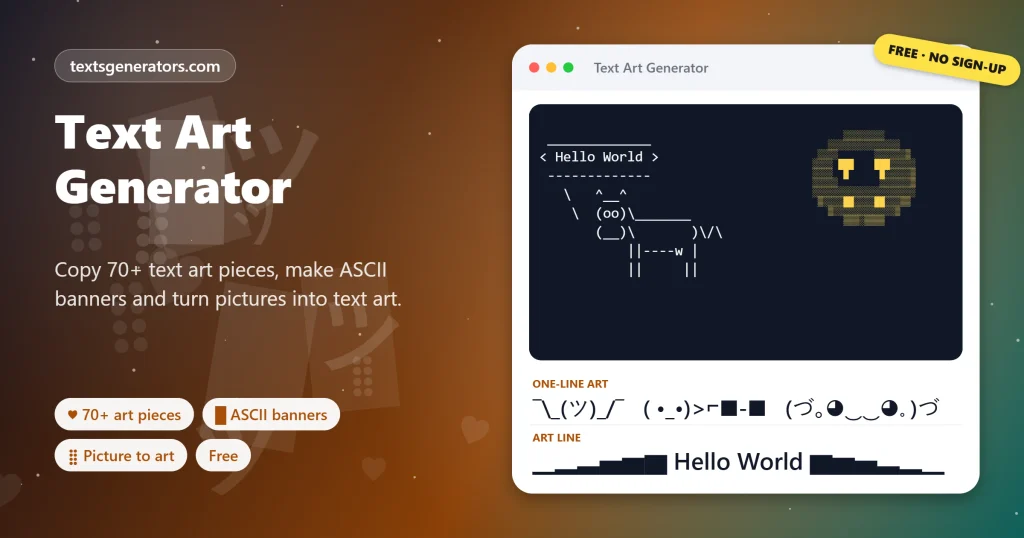
This text art generator gives you three ways in. Copy a ready piece from the library of more than 60 faces, animals, hearts, food, objects, nature scenes, and celebrations. Add your own words to a speech bubble, signpost, or big ASCII banner in 40+ art styles. Or upload a picture and convert it into ASCII characters, shaded blocks, or Braille dot art without the file ever leaving your device.
- 70+ Copyable art pieces
- 7 ASCII banner looks
- 4 Picture art types
What Is the Best Way to Share Text Art?
- Choose a piece or a style: Browse the library, or type a message for bubbles, signs, and banners.
- Tap to copy: Each piece copies in one tap; tick the code block box first for Discord.
- Paste where spacing is kept: Multi-line art needs a fixed-width font, a code block, or a plain text file.
- Check the shape: If lines shift, paste again inside a code block or use one-line art instead.
Which Kinds of Text Art Can You Make Here?
| Type | Built from | Example | Works best in |
| One-line art | Symbols and letters from many alphabets | (ノ◕ヮ◕)ノ*:・゚✧ | Every app, including comments |
| ASCII art | Keyboard characters like / \ _ | # | A cat, a rocket or a house | Discord code blocks, emails, text files |
| ASCII banners | One character repeated in letter shapes | HELLO in blocks or hash marks | Server welcomes, code comments |
| Speech bubbles | Lines and an ASCII character below | A cow saying your message | Group chats, terminal jokes |
| Braille art | Braille dot patterns ⣿ ⣶ ⡇ | A photo in fine dots | Chats, profiles, comments |
| Block art | Shading blocks ░ ▒ ▓ █ | A logo in four tones | Retro posts, code blocks |
If you want huge letters made of Unicode characters or emoji squares rather than ASCII art, the big text generator is the better fit.
How Does Picture to ASCII Art Work?
The converter shrinks your picture to the width you choose, measures how bright each small area is, and swaps it for a character with a matching amount of ink: dense marks like @ and # for dark areas, light ones like a dot or a space for bright areas. Braille mode goes further, packing a two-by-four grid of pixels into each Braille character, so the same width shows four times more detail.
Portraits and logos with strong contrast give the clearest results. Raise the contrast slider for faded photos, and tick Invert if the art will be shown on a dark background, as in Discord’s dark theme.
After posting a banner, style the rest of the announcement with the Discord font generator.
Where Is Copyable Text Art Used?
- Discord and gaming chats: banners in code blocks for server welcomes and event announcements.
- Comments and replies: one-line faces add a reaction where image uploads are not allowed.
- Code and README files: ASCII banners at the top of scripts and project pages.
- Email signatures and newsletters: a small drawing that never breaks as an attachment.
- Birthdays and greetings: a cake, balloon, or bubble message that feels handmade.
- Profiles: Braille dot portraits in bios and about sections.
For animals holding signs and soft kaomoji moods, visit the cute text generator.
Text Art Words to Know
ASCII
The original 128-character computer alphabet; ASCII art uses only these keyboard characters.
Monospace font
A typeface in which every character is equally wide, which multi-line art needs to line up.
Multi-line art depends on equal-width characters, which our monospace text generator explains in detail.
Code block
Text wrapped in three backticks on Discord and similar apps, shown in a fixed-width font.
Kaomoji
Japanese-style faces read the right way up, such as (^_^), built from symbols.
Braille pattern
One of 256 Unicode dot characters, each holding eight on or off dots.
Character ramp
The list of characters from darkest to lightest used to shade picture art.
Everything in This Text Art Generator
Art library
70+ pieces in seven groups, one tap to copy.
Speech bubbles
A cow, penguin, robot, owl, or alien says your words.
Signs and banners
Signposts, scrolls, flags, and tickets around your text.
ASCII banners
Seven looks, including shadow, slant, and your own character.
Picture converter
ASCII, dense, block, or Braille art from any image.
Text file export
Save banners and picture art as .txt files.
Have a photo that would look great in dots?
Convert it into Braille or ASCII art without uploading it anywhere.
Why Does My Text Art Look Broken?
| Problem | Cause | Fix |
| Lines slide out of place | The app uses a font where characters differ in width | Paste inside a code block, or choose one-line art |
| Spaces at the start disappear | The app trims leading spaces | Use a code block, which keeps every space |
| Braille art looks patchy | Blank Braille cells show differently in some fonts | Raise the contrast or tick Invert |
| The art is cut off | The post is longer than the app allows | Lower the width slider or pick a smaller piece |
| Stars in the banner do not line up | Wide symbols take more space than letters | Use the block or hash look for a perfect grid |
Tips for Better Text Art
Short words, big banners
Five or six letters fit a phone screen; longer text wraps and loses its shape.
Match the theme
On a dark chat background, invert picture art so the subject stays bright.
One-liners for comments
Multi-line art belongs in chats and files; comments suit single-line faces.
Keep the original
Save art as a .txt file so you can paste it again without rebuilding it.
Need a single star, heart, or arrow for your own drawing? Pick it from our library of text symbols.
Text Art Generator FAQ
What is a text art generator?
A tool that builds pictures out of typed characters: ready-made art to copy, art styles around your words, ASCII banners, and picture-to-text conversion.
How do I copy text art?
Tap a library piece or a style card once. Then paste it straight into your conversation.
Why does copied text art look wrong in some apps?
Drawings that span several lines rely on equal-width characters. A code block or fixed-width font fixes that; one-line art avoids the problem.
How do I post ASCII art on Discord?
Turn on the code block checkbox first. The art is wrapped in three backticks, so Discord shows it in a fixed-width font.
Can I turn a picture into text art?
Yes. Open Picture to Text Art, choose an image, and pick ASCII, dense ASCII, shaded blocks, or Braille dots.
Is my picture uploaded anywhere?
No. The image is read and converted inside your browser and never sent to a server.
What is Braille art?
Pictures drawn with Unicode Braille dot characters; each character shows a grid of eight dots, which gives fine detail.
Which pictures convert best?
Simple shapes, logos, and portraits with clear contrast. Busy landscapes turn into noise at small widths.
How do I make big letters from characters?
Use the ASCII Banner Maker: type up to 16 characters per line and choose blocks, hash marks, shadow, slant, dots, stars, or your own character.
What is the cow saying text?
It imitates cowsay, a classic program that shows a cow with a speech bubble. The Cow Says style puts your message in the bubble.
Can text art be used in Instagram captions?
One-line art works well. Multi-line drawings may shift because Instagram uses a proportional font and trims spaces.
What is the shrug in text?
It is ¯\_(ツ)_/¯, one of the most copied one-line pieces; it is in the library and in the Shrug style.
Does text art work on phones?
Yes. Copying works on any phone, and pasting into a chat code block keeps multi-line art aligned.
How wide should picture art be?
Around 40 to 60 characters fit most chats; wider art shows more detail but may wrap on small screens.
Can I save text art as a file?
Yes. The banner maker and the picture converter both save a .txt file with one click.
Why use Invert?
Dark chat themes reverse the look of picture art. Inverting keeps the subject bright on a dark background.
Is ASCII art the same as emoji art?
No. ASCII art uses keyboard characters; emoji art arranges colourful emoji, which this page does not need.
Can I add my own text to the art?
Yes. Type in the main box and every speech bubble, sign, one-line style, and banner updates with your words.
Are the library pieces free to use?
Yes. Copy them into chats, posts, and projects freely.
Who invented text art?
Typists created pictures on typewriters in the late 1800s, and computer users carried the habit into ASCII art decades later.
Does this text art generator need a download?
No. Everything runs in the browser on computers and phones.
Make and Copy Text Art
¯\_(ツ)_/¯
Library pieces, speech bubbles, ASCII banners, and picture art.Button idea: ♥ Start Making Text Art
- 3D Text Generator
- Aesthetic Text Generator
- Arrow Text Generator
- Big Text Generator
- Birthday Text Generator
- Bold Italic Text Generator
- Bold Text Generator
- Bracket and Boxed Text Generator
- Bubble Text Generator
- Calligraphy Text Generator
- Christmas Text Generator
- Clap Emoji Text Generator
- Cool Fonts Generator
- Copy and Paste Fonts
- Cursive Generator: Cursive Letters and Fonts
- Cute Fonts Generator
- Decorative Text Generator
- Discord Fonts Generator
- Diwali Text Generator
- Double Struck Text Generator
- Eid Text Generator
- Emoji Text Generator
- Fancy Text Generator
- Flag Text Generator
- Glitch Text Generator: Zalgo and Cursed Text
- Glow Text Generator
- Gothic Text Generator
- Halloween Text Generator
- Heart Text Generator
- Invisible Text Generator
- Italic Text Generator
- LinkedIn Text Generator
- Love Text Generator
- Monospace Text Generator
- Neon Text Generator
- New Year Text Generator
- Old English Font Generator and Translator
- Serif And Sans Serif Text Generator
- Small Caps Generator
- Small Text Generator
- Square Text Generator
- Star Text Generator
- Strikethrough Text Generator
- Stylish Text Generator
- Subscript Text Generator
- Underline Text Generator
- Valentine’s Text Generator
- Vaporwave Text Generator
- Weird Text Generator
No tools match your search. Try another word or choose "All tools".