
Toggle Case Converter: Invert Capitals and Fix Caps Lock Text
Flip every capital to a small letter and every small letter to a capital with this free toggle case converter, no account required. Use it to repair messages typed with Caps Lock on, spot exactly which words were affected, or play with six other case patterns, from alternating words to capital vowels.
- aA invert every letter
- ⇪ smart Caps Lock repair
- 🔍 Caps Lock detector
- 7 case patterns
Your text with letters toggled
Know someone whose Caps Lock is always on?
Send them this free toggle case converter.
Caps Lock Mistakes, Toggled Phrases and Usernames
Messages typed with Caps Lock on plus a few deliberately toggled styles. Copy grabs each example exactly as displayed; Edit in tool loads the corrected or untoggled version.
What Is Toggle Case?
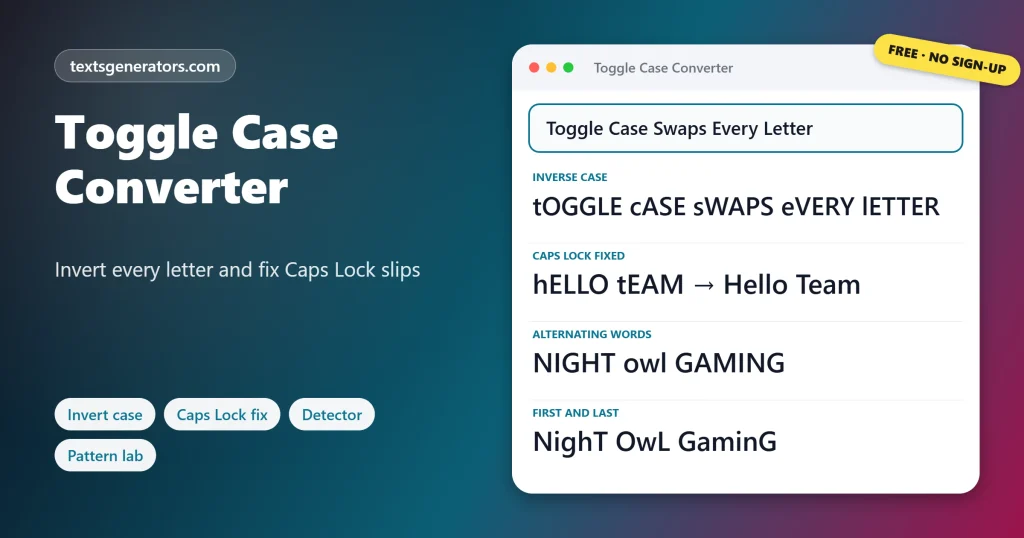
Quick answer: Toggle case, also called inverse case or swap case, reverses the case of every letter: capitals become small letters and small letters become capitals. Toggle Case turns into tOGGLE cASE, and toggling again brings the original back.
The style is easy to recognise because it is exactly what you get when you press Shift while Caps Lock is switched on.
Most people meet toggled text by accident. With Caps Lock on, every letter you type comes out as a capital, except the ones you hold Shift for, which come out small. The result is a sentence like I WILL CALL YOU LATER. Toggling it once restores normal writing. This tool does that, but it goes further: the Caps Lock fix works sentence by sentence so correct text nearby is not harmed, the detector shows you every affected word, and the pattern lab offers seven playful alternatives for usernames and posts.
- 1 Click to swap every letter
- 2 Levels of Caps Lock detection
- 7 Patterns in the lab
- 7 Case formats
How Do You Invert the Case of Text?
- Paste the text, or type it straight into the box.
- Choose an action: iNVERSE cASE swaps everything; Fix Caps Lock text only repairs the mistakes.
- Check and undo: The note under the toolbar says if any slips remain.
- Copy it back: Paste the repaired message where it belongs.
For UPPERCASE, lowercase, Title Case, and coding cases, open the case converter.
How Do You Fix Caps Lock Text?
Writing produced with Caps Lock engaged has a clear fingerprint: most letters are capitals, but the letters you shifted, typically sentence openers and names, are small. Swapping the case of those sentences restores them exactly. The trouble with swapping a whole message is that sentences you typed correctly get ruined, so the Fix Caps Lock text button checks each sentence separately and only swaps the ones with the fingerprint. Words such as HELLO in the middle of normal text are fixed on their own. Sentences written entirely in capitals are left alone unless you ask, because they are often deliberate.
After fixing Caps Lock, polish the result with the sentence case converter.
| Typed with Caps Lock on | After the fix |
| hELLO tEAM. | Hello Team. |
| I AM RUNNING LATE TODAY. | I am running late today. |
| Thanks, see you soon | Thanks, see you soon |
Want alternating caps for a meme? The SpongeBob mocking text generator adds random patterns and images.
Can Word, Python, or JavaScript Toggle Case?
| Where | How to toggle |
| Microsoft Word | Home tab, Change Case (Aa), toggle case |
| Google Docs | No toggle option; use this converter |
| Python | text.swapcase() |
| JavaScript | No built-in; map each character, swapping toUpperCase and toLowerCase |
| PHP | No built-in; combine strtoupper and strtolower per character |
| Excel | No function exists; run the column through this page and paste the output back |
To drop every capital instead of swapping them, use the lowercase converter.
How Can You Stop Typing With Caps Lock by Mistake?
- Windows: turn on Toggle Keys in the accessibility settings to hear a tone whenever Caps Lock is pressed.
- macOS: remap Caps Lock to another key, or to nothing, under Keyboard, Modifier Keys.
- Phones: Caps Lock only engages with a double tap of Shift, so a single tap is safe.
- Keyboards with a light: glance at the Caps Lock indicator before typing a password.
- Password boxes: many sign-in screens warn you when Caps Lock is on; read the warning.
When Would You Use a Toggle Case Converter?
- Repairing emails: rescue a message typed with Caps Lock on.
- Chat logs: fix the odd hELLO in a long transcript.
- Usernames: give a gamer tag or handle an inverted look.
- Design: try unusual capitalization for a logo or poster line.
- Testing software: check that search and logins handle mixed case.
- Teaching: show how letter case works in a computer.
Need a username to style? Find one with the nickname generator.
Toggle Case Terms
Toggle
To switch between two states, here between capital and small.
Inverse case
Another name for toggle case.
Caps Lock
The key that makes every letter a capital until pressed again.
Shift key
Held down for one capital; with Caps Lock on, it gives a small letter.
swapcase
Python’s built-in method for toggling the case of a string.
Toggle Keys
A Windows setting that sounds a tone when Caps Lock is pressed.
Why Use This Toggle Case Tool?
Full swap
Every letter flipped at once.
Smart fix
Only the Caps Lock sentences.
Detector
Lists each affected word.
Selection
Toggle one part only.
Pattern lab
Seven creative styles.
Undo
Every step reversible.
Not sure which words were typed with Caps Lock?
The detector lists every slip and fixes them without touching the rest.
🔍 Open the Detector
Toggled Text Still Looks Wrong?
| Situation | Reason | What helps |
| A shouted sentence was not fixed | Plain capitals may be intentional | Tick the option to calm all-capital sentences |
| Correct sentences became inverted | iNVERSE cASE swaps everything | Undo, then use Fix Caps Lock text instead |
| A two-letter word was not caught | Short words are too ambiguous to judge | Toggle it by highlighting just that word |
| An acronym became small | It sat inside a Caps Lock sentence | Retype the acronym after fixing |
Tips for Mixed-Case Text
Toggle twice to undo
Swapping case is its own reverse, so a second press restores the text.
Fix before sending
A quick paste here saves an awkward follow-up email.
Keep patterns short
Creative case styles suit names and short captions, not paragraphs.
Watch passwords
Passwords are case-sensitive, so Caps Lock is a common reason a login fails.
Toggle Case Converter FAQ
What is a toggle case converter?
A tool that flips the case of each letter, turning capitals into small letters and small letters into capitals.
What does toggle case look like?
hELLO wORLD is the toggled form of Hello World.
Is toggle case the same as inverse case?
Yes. Toggle case, inverse case, invert case, and swap case all mean the same thing.
How do I repair a Caps Lock accident?
Press Fix Caps Lock text. It swaps only the sentences and words that show the Caps Lock pattern.
Why does Caps Lock make text look like tHIS?
With Caps Lock on, Shift produces small letters, so the letter you meant to capitalize comes out small and the rest come out large.
Will fixing Caps Lock break my correct sentences?
No. Each sentence is checked on its own, and normal ones are left as they are.
What happens to sentences written fully in capitals?
They stay unchanged unless you tick the option to calm them, since capitals can be intentional.
How can I see which words were typed with Caps Lock?
Paste the text into the Caps Lock Detector; it lists every affected word or sentence with its corrected form.
Does toggling twice restore the original?
Yes. Inverting the case a second time gives back exactly what you started with.
Can I toggle only part of the text?
Yes. Highlight the part first and then press the button.
Does Microsoft Word have toggle case?
Yes. The Change Case button on the Home tab includes tOGGLE cASE.
How do I toggle case in Python?
Call swapcase() on a string, for example, name.swapcase().
Is there a toggle case function in JavaScript?
No. You map over the characters and swap each one with toUpperCase or toLowerCase.
What is alternating case?
Capital letters and small letters taking turns letter by letter, such as aLtErNaTiNg.
What patterns does the Case Pattern Lab offer?
Inverse, alternating letters, alternating words, capital vowels, capital consonants, first and last letters, and a capital on every Nth letter.
How do I stop Caps Lock accidents on Windows?
Turn on Toggle Keys in the accessibility settings to hear a tone when Caps Lock is switched on.
Does the tool work with accented letters?
Yes. Letters such as é and Ü swap case like any other letter.
Is the toggle case converter free?
Yes. Swapping, fixing, detecting, and the pattern lab cost nothing.
Is my text stored?
No. Letters are swapped locally and forgotten when you close the tab.
Can I download the result?
Yes. Download .txt saves the text in the main box.
Does toggling work on mobile devices?
Yes. It works with touch screens and your phone’s selection handles.
Toggle the Case
aBC → Abc
Invert letters and repair Caps Lock slips in one click. aA Start Toggling
- Alphabetical Order Tool: Sort Lists A to Z Online
- camelCase Converter: Turn Words and Names Into camelCase
- Capitalize the First Letter of Each Word, Sentence, or Line
- Case Converter: Change Text to UPPERCASE, lowercase, or Title Case
- Find and Replace Text Online: Swap Words in Seconds
- Lowercase Converter: Change CAPS to Small Letters
- Minecraft Color Codes and Colored Text Generator
- Number-to-Words Converter: Amount in Words for Cheques
- PascalCase Converter: Class, Type and Component Names
- Plain Text Converter: Remove Formatting and Hidden Characters
- Remove Duplicate Lines: Delete Repeated Lines and List Items
- Remove Extra Spaces: Delete Double Spaces and Fix Spacing
- Remove Line Breaks: Fix Broken Lines From PDFs and Emails
- Roman Numeral Converter: Numbers and Dates to Roman
- Sentence Case Converter: Turn Any Text Into Proper Sentences
- Snake Case Converter: Words and camelCase to snake_case
- Text Repeater: Repeat Text, Words and Emoji Up to 10,000 Times
- Title Case Converter: Capitalize Titles in AP, APA, Chicago, and MLA Style
- Uppercase Converter: Change Lowercase to Capital Letters
- URL Slug Generator: Turn Titles Into SEO-Friendly Slugs
- Word Combiner: Mix Words and Keyword Lists Into Every Combination
No tools match your search. Try another word or choose "All tools".