
Emoji Text Generator 😎 𝗘𝗺𝗼𝗷𝗶 ✨ 𝗧𝗲𝘅𝘁 🔥
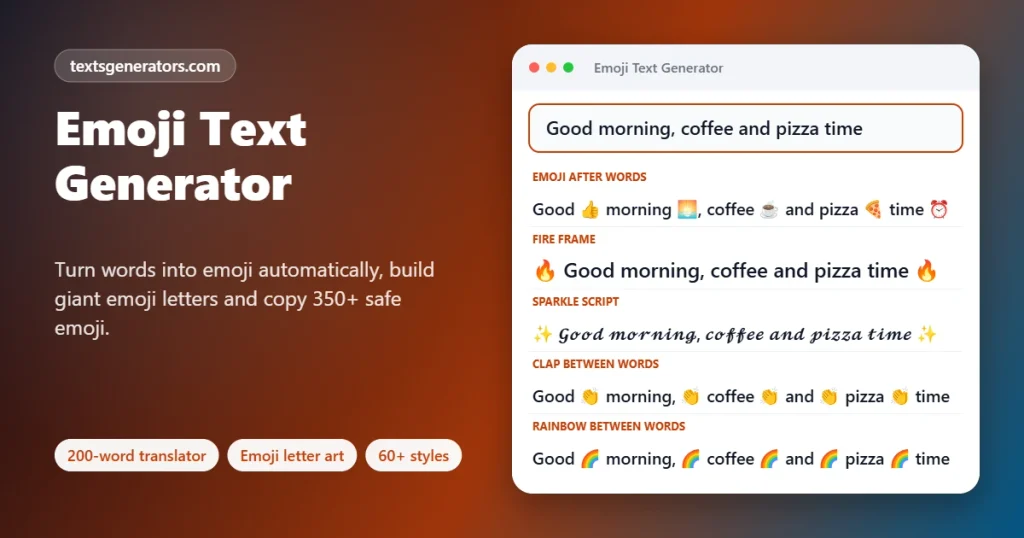
Turn plain words into emoji-packed messages. Swap words for matching emoji automatically, build giant block letters out of any emoji, frame text with fire, sparkles or skulls, and pick from a keyboard of 350 well-supported emoji, with no Windows boxes.
- 60+ emoji styles
- 200-word emoji translator
- Big letters made of emoji
- 350 safe emoji to pick
A plain click slips the picture into the message box at the cursor; hold Shift while clicking to put it on the clipboard instead.
All emoji text styles
Know someone who only replies in emoji?
Send them the generator and watch their messages get even louder.
Emoji Captions, Chat Replies, Bios and Hype Posts
Ready-made lines already mixed with emoji. Copy grabs the line with its emoji intact; Edit in tool sends the text up so you can try it in sixty other looks.
What Is an Emoji Text Generator?
An emoji text generator mixes emoji into your words automatically: it can swap words for pictures, surround a caption with fire or sparkles, or draw whole letters out of emoji blocks.
Typing emoji one by one from a phone keyboard is slow, and finding the right picture for each word takes even longer. This page does the hunting for you. The translator knows more than 200 everyday words, from pizza to rocket, and places the matching picture after, before, or instead of each one. Frames and separators add a mood to an entire sentence in one tap.
There is also a letter-art builder that spells a word in giant five-row letters made of any emoji you choose, a common trick in Discord servers and group chats, and a keyboard of 350 emojis chosen because they display on Windows 10 as well as on new phones, so friends on older laptops do not see empty rectangles.
- 200+ Words with a matching emoji
- 36 Letters and digits in the art font
- 350 emojis in the safe keyboard
How to Add Emoji to Text Automatically
- Write your message: A caption, a reply, or a bio line goes in the box.
- Pick a placement: Word to Emoji translates; Frames wrap the line; Emoji Between puts a symbol after every word.
- Tweak the details: Use the translator panel to choose before, after, or replace, or tap the keyboard to drop in extra emoji.
- Copy it: The Copy button grabs the full result, including skin tones and joined emoji.
How Emoji Work as Text
Every emoji is a Unicode character, just like the letter A, so it can be pasted anywhere text is accepted. Some are built from several pieces glued together. A family emoji joins people with an invisible zero-width joiner, a skin tone adds a modifier, and a red heart often carries a variation selector telling the device to draw it in colour instead of as a black outline.
| Emoji | Made of | Length in most counters |
| 😀 | One code point | 2 |
| ❤️ | Heart plus colour selector | 2 |
| 👍🏽 | Thumbs up plus skin tone | 4 |
| 1️⃣ | Digit, selector and keycap mark | 3 |
| 👩⚕️ | Woman, joiner, staff of Aesculapius, selector | 5 |
Which Emoji Show Up Everywhere?
New emoji arrive every year, but devices only learn them after a system update. Windows 10 stopped receiving new emoji around version 12, so pictures such as the melting face or the heart hands appear there as hollow squares. The keyboard on this page sticks to older, universally supported emoji, and the letter tiles style is marked Font-dependent because regional indicator letters look different on every platform.
- Emoji up to version 12 (2019) show on Windows 10, Android 10 and iOS 13 or newer.
- Colour depends on the app: the same smiley looks different on WhatsApp, iPhone and Samsung.
- Regional indicator letters next to each other can merge into a country flag; the tiles style inserts an invisible gap to stop that.
Everything This Emoji Tool Includes
Word translator
Over 200 words with plural and -ing detection.
Letter art
Five-row block letters in any emoji, side by side or stacked.
Safe keyboard
Eight groups of emoji that render on older PCs.
20 frames
Fire, skulls, sparkles, crowns and more.
Word separators
Twelve emoji to drop between every word.
Emoji alphabet
A for apple, B for bee: spell words in pictures.
Length limits
Instagram bio, TikTok bio and SMS presets.
Favourites
Star the styles you reuse most.
Export
Save every style as a .txt file.
Want your name in giant emoji?
Build block letters from fire, hearts, or any emoji you like.
Tips for Using Emoji Well
1. One mood per message
Three matching emoji read better than ten random ones.
2. Think about screen readers
Each emoji is read aloud by name, so emoji between every word becomes tiring to listen to.
3. Check meanings
The skull means “I am laughing so hard” for many young users, not danger.
4. Use stacked letter art on phones
Side-by-side art wraps on narrow screens; the one-letter-per-block layout stays tidy.
5. Watch SMS length
A single emoji switches an SMS to a mode with only 70 characters per part.
6. Keep business posts light
One emoji at the start of each bullet helps scanning without looking spammy.
Emoji Problems and Their Fixes
| Problem | Why | Fix |
| Emoji show as boxes with an X | The system font predates that emoji | Update the device or pick from the safe keyboard |
| Letter tiles turned into flags | Two regional letters touched and paired up | Copy the tiles style again; it keeps an invisible gap |
| Letter art looks jagged | The app wraps long lines | Choose one letter per block or a shorter word |
| A heart appears black | The colour selector was lost on paste | Copy the red heart from the keyboard again |
| Some words were not translated | The word is not in the dictionary | Add an emoji yourself from the keyboard |
| The bio is over the limit | Emojis count as two or more characters | Set the Instagram bio limit and hide long styles |
This Emoji Generator Versus Phone Keyboards
| Task | This page | Phone emoji keyboard |
| Add emoji to a whole paragraph | ✅ One click | One emoji at a time |
| Giant emoji letters | ✅ Any word | ❌ |
| Emoji between every word | ✅ Twelve choices | Manual |
| Shows which emoji work on old PCs | ✅ | ❌ |
| Works on a desktop browser | ✅ | Needs Win + . or a phone |
| Character count for bios | ✅ | ❌ |
Emoji Text Generator: Your Questions
What is an emoji text generator?
It adds emoji to ordinary sentences for you, by translating words into pictures, framing lines, placing symbols between words or drawing letters from emoji.
How does the emoji translator choose emoji?
It checks each word against a list of more than 200 common words, also trying the word without a final s or -ing, and inserts the matching emoji.
Can I replace words with emoji completely?
Yes. Pick “Swap the word for emoji” in the translator, or use the Emoji Instead of Words style.
How do I make big letters out of emoji?
Open Emoji Letter Art, type a word of up to 12 letters, choose the emoji for the letters and a background, and copy the result.
Why does the emoji letter art look broken on my phone?
Long rows wrap on narrow screens. Switch the layout to one letter per block so each letter stays five emoji wide.
Which emoji work on Windows 10?
Emoji released up to 2019 are supported. Every emoji in the keyboard panel falls into that group, so they display on Windows 10 too.
Why do I see empty boxes instead of emoji?
The device font does not include that emoji yet. Updating the system fixes it, or choose an older emoji from the keyboard.
How many characters does an emoji use?
Usually two in Instagram, X, and most counters, but emojis with skin tones, joiners, or keycaps can take three to seven.
Can I put an emoji between every word?
Yes. The Emoji Between group offers clap, fire, sparkles, skull, heart, pointing finger, and six more separators.
What are the blue letter tiles?
They are regional indicator symbols, the building blocks of flag emoji. Shown alone, they look like letters in boxes on most phones.
Do these emoji styles work on Instagram and TikTok?
Yes. Emojis are standard text, so they paste into captions, comments, and bios. Check the length limit first.
Can I use emoji on Discord?
Yes. Paste them directly; Discord also turns them into its own emoji images. Letter art must stay under 2,000 characters.
How do I type emoji on a computer?
On Windows, press Win and the full stop key, and on a Mac, press Control, Command, and Space. Or tap any emoji in the keyboard panel here.
Does every phone show the same emoji picture?
No. Apple, Google, Samsung, Microsoft and WhatsApp each draw their own designs, so faces and colours vary slightly.
What does the skull emoji mean in chats?
Among younger users, the skull usually means “I am dead from laughing”, a stronger version of the crying-laughing face.
Can I type a word and have it spelled in emoji pictures?
Use the Emoji Alphabet style: A becomes an apple, B a bee, C a cat, and so on through Z.
Is the emoji translator available in other languages?
The dictionary covers English words. Words in other languages are kept unchanged, so you can still add frames or separators.
Are emojis accessible to blind users?
Screen readers say each emoji name aloud. Use a few meaningful emoji rather than one after every word.
Why did my red heart turn black?
Some apps drop the invisible colour selector. Copy the heart from the keyboard again so the selector is included.
Does this emoji tool store what I type?
No. Translations and letter art are created on your device; only stars and the recent-copy list are remembered locally.
Is the emoji text generator free to use?
Yes, with no account, no limits, and no watermark on anything you copy.
Make Every Message Pop
😎 𝗘𝗺𝗼𝗷𝗶 𝓮𝓿𝓮𝓻𝔂𝓽𝓱𝓲𝓷𝓰 🔥
A word translator, giant emoji letters, and a safe emoji keyboard, free. 😎 Add Emoji to My Text
- 3D Text Generator
- Aesthetic Text Generator
- Arrow Text Generator
- Big Text Generator
- Birthday Text Generator
- Bold Italic Text Generator
- Bold Text Generator
- Bracket and Boxed Text Generator
- Bubble Text Generator
- Calligraphy Text Generator
- Christmas Text Generator
- Clap Emoji Text Generator
- Cool Fonts Generator
- Copy and Paste Fonts
- Cursive Generator: Cursive Letters and Fonts
- Cute Fonts Generator
- Decorative Text Generator
- Discord Fonts Generator
- Diwali Text Generator
- Double Struck Text Generator
- Eid Text Generator
- Fancy Text Generator
- Flag Text Generator
- Glitch Text Generator: Zalgo and Cursed Text
- Glow Text Generator
- Gothic Text Generator
- Halloween Text Generator
- Heart Text Generator
- Invisible Text Generator
- Italic Text Generator
- LinkedIn Text Generator
- Love Text Generator
- Monospace Text Generator
- Neon Text Generator
- New Year Text Generator
- Old English Font Generator and Translator
- Serif And Sans Serif Text Generator
- Small Caps Generator
- Small Text Generator
- Square Text Generator
- Star Text Generator
- Strikethrough Text Generator
- Stylish Text Generator
- Subscript Text Generator
- Underline Text Generator
- Valentine’s Text Generator
- Vaporwave Text Generator
- Weird Text Generator
No tools match your search. Try another word or choose "All tools".